Home: Multi-Computer Network Connection GEOIP Visualization

connmapperl

Real-time geographic visualization of all your computers' network connections — plotted on a world map, colored by type, categorized by ASN, queryable by SQL.
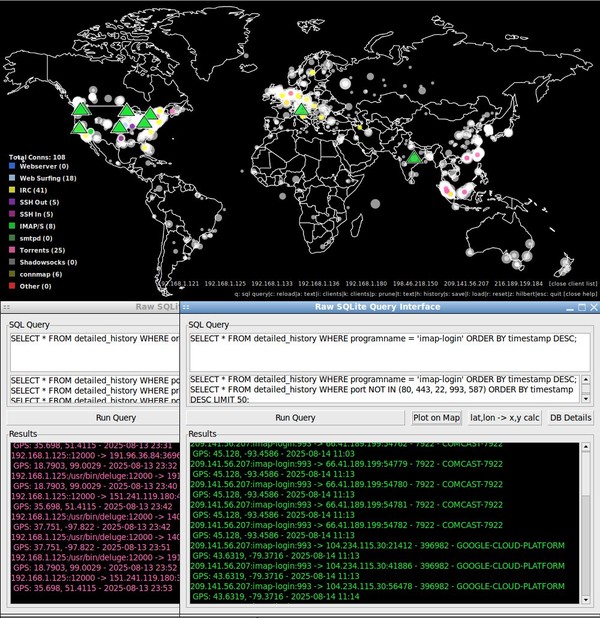
connmapperl SQL query interface screenshot

One runs connmapperl-server.pl to open the map GUI. Then a connmapperl-client.pl is run, either on the same computer, or any computer that has an IP connection. This client connects to the server GUI which then shows the geoip locations of all active connections on the computer running the client. It supports displaying many clients' active connections at once.

connmapperl.tar.gz (90MB)

The full package with everything ready to run, all the ssl certs pre-generated, registry DBs, geoip resources, etc included. Just decompress and run from inside the created folder.

connmapperl-server.pl (source)

The GUI. Runs on your desktop. Receives connection data from clients over SSL, geolocates and offline ASN look-ups each IP (via ip2asn.pl+RIR DBs), draws colored dots on a world map, and provides interactive popups, SQL history queries, and a Hilbert curve IP visualizer.

connmapperl-client.pl (source)

The headless agent. Runs on any machine you want to monitor. Every second it collects active connections with ss and streams them to the server over SSL. Reconnects automatically on disconnect.

connmapperl.tar.gz files & directories

./
├── connmapperl-server-ssl.pl   # server GUI
├── connmapperl-client-ssl.pl   # headless client
├── ip2asn.pl                   # local whois tool
├── connmapperl2rc.beep         # color rules config
├── server-cert.pem             # SSL cert (auto-generated)
├── server-key.pem              # SSL private key (auto-generated)
├── .connmap-history2.sqlite    # detailed history DB (auto-created)
├── .connmap-history2.dat       # simple history (Storable, auto-saved)
└── resources/
    ├── w1000-old.png             # world map image (1000x500)
    ├── ipv4.csv                  # IP-lat/lon binary-search DB
    ├── GeoLite2-ASN-Blocks-IPv4.csv # MaxMind ASN DB
    ├── beep-07a.wav              # alert sound (optional)
    ├── sorted_all-rir-delegations.txt # for ip2asn (optional)
    ├── caida_asn_to_name.dbm     # for ip2asn (optional)
    ├── 20250701.as-org2info.txt   # for ip2asn fallback (optional)
    └── *.db.aut-num              # raw whois dumps (optional)

required   auto-generated   optional

What it is

Explaination

connmapperl is my port and then many-featured fork of connmap, an X11 GUI program that shows a map of the world with red dots representing the geoip lookup location of established ipv4 connections on the machine it is run.

My fork that I currently develop and bugfix is connmapperl-server and connmapperl-client. This is a GUI server that listens for connections from the very lightweight and portable headless client script which gathers data. The server plots all of the clients on various computers ipv4-port-processname-geolocation entries on the same map and gives the ability to use a connmap2rc file to create custom port/application rules to color code and control display options for IPv4 established connections that match it. This client to server connection is TLS wrapped and the key is baked in with example commands showing how to generate a new one and change it if desired.

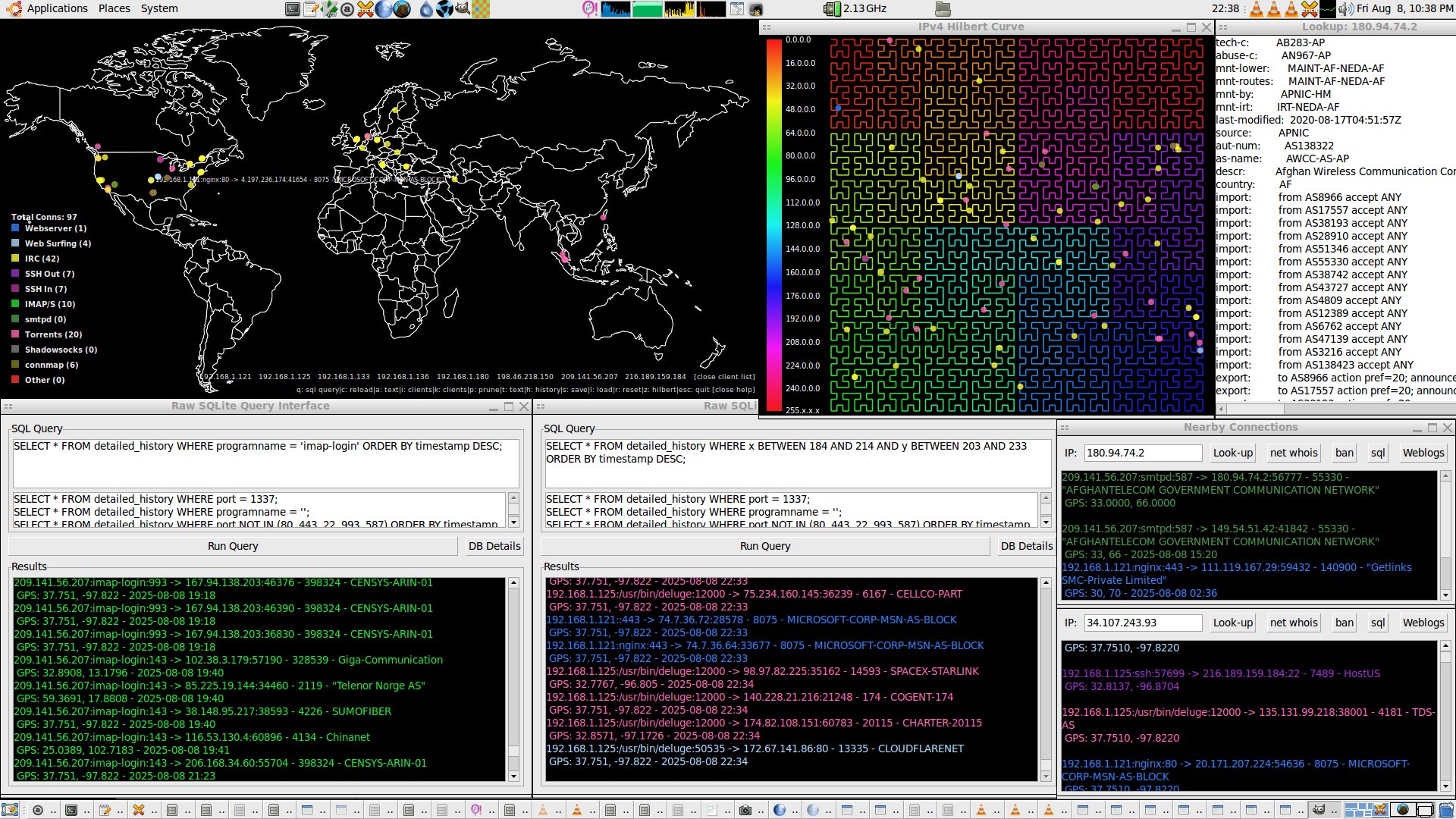
In addition to simple dots and color coding my fork uses sqlite to keep a database of history connections over a user set time period shown as transparent white dots who's size scales with connection entry frequency (togglable with 'h'). This SQL DB is easily custom queried from the built in SQL tool ('q') and plotted results are shown as triangles. In addition right-clicking the map auto-generates a location radius based SQL query returning only results under the mouse's circle. I also included a hilbert mapping visualizer of the ipv4 space for fun and right-clicking works there too.

The GUI server does take some ram, about 250MB. It (finally) does not leak memory (tested over many months on multiple distros). It's CPU use barely registers on a core2duo. The client is even lighter at about 40MB of RAM and negligable CPU use.

And yeah, this is heavily vibe-coded.

Overview

connmapperl is a two-program Perl suite that collects live TCP/UDP connections from one or more machines and streams them to a GTK2 GUI server, which plots each connection as a colored dot on a world map — geolocated entirely from local database files with no external API calls.

connmapperl-server-ssl.pl

The GUI. Runs on your desktop. Receives connection data from clients over SSL, geolocates each IP, draws colored dots on a world map, and provides interactive popups, SQL history queries, and a Hilbert curve IP visualizer.

connmapperl-client-ssl.pl

The headless agent. Runs on any machine you want to monitor. Every second it collects active connections with ss and streams them to the server over SSL. Reconnects automatically on disconnect.

ip2asn.pl

A standalone local whois replacement. Given an IP address, it looks up the owning organization, ASN, country, geolocation, and raw whois record — all from local database files. Used by the server's right-click popup.

How data flows

connmapperl-client-ssl.pl monitored host ss -tu -n -p
Storable/SSL
server GUI connmapperl-server
binary search
local DB files ipv4.csv / GeoLite2
Cairo/GTK2
output world map

Multiple client machines can connect to a single server simultaneously. Each client's connections are tracked independently and can be toggled on or off from the map's client list overlay. All connection history is stored in a local SQLite database and survives restarts.

connmapperl-server-ssl.pl

Server GUI

SQL search plot on map screenshot

A single-threaded GTK2 application. All I/O is non-blocking, driven by Glib timers. The map is a Mercator-projected PNG image with connection dots drawn on top via Cairo.

The Map Display

Each active connection appears as a filled circle on the world map. The circle's color is determined by the first matching rule in your config file. Connections that match no rule are drawn in the default red color and labeled Other. Moving the mouse over the lower-left legend shows the historical min/max connection count per rule type.

When multiple connections share the same geographic point, only the topmost dot is normally visible. Hovering your mouse near any such stacked dot reveals an animated ring that cycles through all the colors present at that location, with a count badge (e.g. 3x) indicating how many connections are stacked. Press f to enable this animation globally for all stacked dots.

Connection History

Every unique connection seen is recorded to a SQLite database (.connmap-history2.sqlite). Press h to toggle a white dot overlay showing all historical connection locations — dot size scales logarithmically with connection count. The history is pruned automatically on a configurable timer to prevent unbounded growth.

Right-Click Popup

Right-clicking anywhere on the map opens a Nearby Connections popup listing all connections (live and historical) within 15 pixels of the click point. From this popup you can:

SQL Query Interface

Press q to open a raw SQLite query window against the full connection history database. Results are displayed in the order returned by your ORDER BY clause and color-coded by rule. A Plot on Map button overlays query results as triangles on the map for 15 seconds.

Hilbert Curve Visualizer

Press z to open a window showing all live connection IPs plotted on a space-filling Hilbert curve of the entire IPv4 address space. The background is colored by first octet (0-255 mapped through the full hue range) so geographic clustering of IP allocations becomes immediately visible. Right-clicking shows the same connection popup as the main map.

History Replay

Press g to replay all stored history as an animation over 30 seconds. Each event appears as a triangle that fades out after 2 seconds, giving a time-lapse view of connection patterns.

connmapperl-client-ssl.pl

Client

A minimal, headless Perl script. Install it on every machine whose connections you want to see on the map. It requires only ss (from iproute2) and a few standard Perl modules.

What it collects

Every second the client runs ss -tu -n -p -o -4 and parses the output into a list of connection records. Each record contains:

TCP connections must be in ESTAB state. UDP connections are included if they have a real peer address (i.e. not listeners).

Running the client

# On the same machine as the server (LAN)
perl connmapperl-client-ssl.pl 192.168.1.100 YourPassword

# From a remote machine over the internet
perl connmapperl-client-ssl.pl 203.0.113.50 YourPassword

# From a remote machine over the internet using a hard coded (in the .pl password
perl connmapperl-client-ssl.pl 203.0.113.50

The server IP defaults to 192.168.1.121 and password to the compiled-in default if no arguments are given. The client will reconnect automatically with exponential backoff (up to 5 minutes between attempts) if the server is unreachable.

SSL Certificate

The client authenticates the server using an SSL certificate. It looks for server-cert.pem in the current directory. If not found, it falls back to a certificate embedded as base64 inside the script. Copy the server's server-cert.pem to the client machine, or replace the embedded base64 with your own certificate.

connmapperl2rc.beep

Configuration File

The config file defines color rules for classifying connections. Each rule assigns a label, color, and display behavior to connections matching a specific local port, peer port, port range, or application name.

Format

# connmapperlrc - Configuration for ConnMapperl
# Format: KeyLabel,Type,Target,Red,Green,Blue,Alpha,ShowText,BeepOnMatch
# Type can be 'local', 'peer', or 'app'. Target is a port, port-range, or application name.
# ShowText: 1 = Display dot and text by default, 0 = Display dot only till toggled
# BeepOnMatch: 1 = make noise, 0 = don't make noise
"Webserver",local,80,0.2,0.5,1,0.8,1,0
"Webserver",local,443,0.2,0.5,1,0.8,1,0
"Web Surfing",peer,80,0.68,0.85,1.0,0.8,0,0
"Web Surfing",peer,443,0.68,0.85,1.0,0.8,0,0
"IRC",peer,6660-6697,1,1,0.2,0.8,0,0
"IRC",peer,5555,1,1,0.2,0.8,0,0
"SSH Out",peer,22,0.6,0.2,0.8,0.8,0,0
"SSH In",local,22,0.7,0.2,0.6,0.8,0,0
"IMAP/S",peer,993,0.1,0.9,0.2,0.8,0,0
"IMAP/S",local,993,0.1,0.9,0.2,0.8,0,0
"IMAP/S",local,143,0.1,0.9,0.2,0.8,0,0
"smtpd",local,587,0.3,0.6,0.3,0.8,0,0
"smtpd",local,25,0.3,0.6,0.3,0.8,0,0
"Torrents",local,12000,1.0,0.4,0.7,0.8,0,0
"Torrents",peer,12000,1.0,0.4,0.7,0.8,0,0
"Torrents",app,"/usr/bin/deluge",1.0,0.4,0.7,0.8,0,0
"Shadowsocks",peer,31415-31416,0.5,0.5,0.5,0.8,0,0
"Shadowsocks",local,31415-31416,0.5,0.5,0.5,0.8,0,0
"connmap",local,6789,0.5,0.5,0.1,0.8,0,0
"connmap",peer,6789,0.5,0.5,0.1,0.8,0,0
"Bitcoin",app,bitcoin-qt,0.90,0.50,0.20,0.8,0,0

Rule matching

Rules are evaluated in order; the first match wins. A connection is matched against local type rules by its local port, peer type rules by the remote port, and app type rules by the program name reported by ss. Port ranges use the N-M syntax. Connections that match no rule are shown in default red as Other.

Example ruleset — color reference

LabelTypeTargetShowTextBeep
Webserverlocal80, 443yesno
Web Surfingpeer80, 443nono
IRCpeer6660-6697, 5555nono
SSH Outpeer22nono
SSH Inlocal22nono
IMAP/Speer, local993, 143nono
smtpdlocal587, 25nono
Torrentslocal, peer, app12000, /usr/bin/delugenono
Shadowsockspeer, local31415-31416nono
connmaplocal, peer6789nono
Bitcoinappbitcoin-qtnono
Otherno matchyesconfigurable

The BeepOnMatch column triggers an audio alert (via aplay) when a new connection matching that rule is first seen. The global b key separately toggles beeping for all Other (unmatched) connections. The beep command and audio file path are configured at the top of the server script.

Press c to reload the config file at runtime without restarting. Press a to toggle all rule text labels on or off at once. Click a rule's colored square in the legend to toggle that rule's text labels individually.

Keyboard shortcuts

Key Bindings

The server GUI is operated primarily by single-key shortcuts. The window is borderless and can be dragged from anywhere on the map by left-click-and-drag.

KeyAction
hToggle historical connection dot overlay
tToggle all connection text labels globally
aToggle all rule text labels on/off at once
fToggle stacked-dot color animation globally (also activates near mouse when off)
mToggle display of local/LAN IP connections (hidden by default)
cReload color rules from config file
sSave simple history to disk
lLoad simple history from disk
rReset all history, stats, and clear the SQLite database
pOpen history pruning settings (time limit, enable/disable)
qOpen SQL query interface
gStart / stop 30-second history replay animation
zOpen IPv4 Hilbert curve visualizer window
iShow connected client info (IP, file descriptor)
kShow the client visibility list overlay
bToggle audio beep for unclassified (Other) connections
EscSave history and quit

Mouse interactions

ActionEffect
Left-click dragMove the borderless window
Right-click on mapOpen Nearby Connections popup for that location
Left-click legend color boxToggle text labels for that rule
Left-click legend label textOpen connection list for that rule
Hover over legend labelShow historical Max connection count for that rule
Hover near stacked dotShow animated color cycle for connections at that point

History database

SQL Query Examples

Press q to open the SQL interface. The database is a SQLite file at .connmap-history2.sqlite with a single table detailed_history. Results respect your ORDER BY clause and are color-coded by rule.

Schema

id, timestamp, ip, port, local_ip, local_port, programname,
full_lookup, asn, orgname, lat, lon, x, y, count
// connections in the last 30 seconds
SELECT * FROM detailed_history WHERE timestamp > (strftime('%s', 'now') - 30) ORDER BY timestamp ASC;
// all SSH brute-force attempts
SELECT * FROM detailed_history WHERE programname = 'sshd' ORDER BY timestamp DESC;
// unusual ports (not standard services)
SELECT * FROM detailed_history WHERE port NOT IN (80, 443, 22, 993, 587) ORDER BY timestamp DESC LIMIT 50;
// connections from a specific org in the last hour
SELECT * FROM detailed_history WHERE orgname LIKE '%Cloudflare%' AND timestamp > (strftime('%s', 'now') - 3600) ORDER BY timestamp DESC;
// IPs from the last 30 seconds
SELECT * FROM detailed_history WHERE timestamp > (strftime('%s', 'now') - 30) ORDER BY timestamp DESC;
// "Other" connections — nothing in the ruleset matched
SELECT * FROM detailed_history
WHERE programname NOT IN ('/usr/bin/deluge', 'bitcoin-qt')
  AND local_port NOT IN (80, 443, 22, 993, 143, 587, 25, 12000, 6789)
  AND port NOT IN (80, 443, 22, 993, 12000, 6789, 5555)
  AND NOT (port BETWEEN 6660 AND 6697)
  AND NOT (port BETWEEN 31415 AND 31416)
  AND NOT (local_port BETWEEN 31415 AND 31416)
ORDER BY timestamp DESC;
// IPs that only ever appear with a specific program
SELECT * FROM detailed_history AS t1
WHERE t1.programname = 'sshd'
  AND NOT EXISTS (
    SELECT 1 FROM detailed_history AS t2
    WHERE t2.ip = t1.ip AND t2.programname != 'sshd'
  );

The Plot on Map button in the SQL window overlays results as white-outlined triangles on the map for 15 seconds, useful for visualizing geographic clustering of query results.

Getting started

Setup

The server and client are designed to run on Linux. The server requires GTK2 Perl bindings. The client requires only ss (iproute2) and core Perl modules.

Server setup

Start the server

perl connmapperl-server-ssl.pl

The GUI window will open on port 6789. Edit $listen_port and $required_password at the top of the file to change defaults.

Edit the config file

You can use the default as is but you'll see a lot of 'Other' connection types. Edit ./connmapperlrc2.beep to suit your tastes then press the 'c' key to reload it without restarting if it's already running.

Optionally generate *new* SSL certificate

It should come with the cert that I made. And if you're fine with using the default then use it. You can still change the password so it doesn't really matter. But if you want your own cert for TLS then the the below once in the server's working directory. The server will do this automatically if openssl is found and no certs exist.

openssl req -x509 -newkey rsa:4096 -keyout server-key.pem \
  -out server-cert.pem -sha256 -days 3650 -nodes \
  -subj "/CN=connmap.server"

Client setup

If you made a new cert, copy the certificate

Copy server-cert.pem from the server to the same directory as the client script on each monitored machine. Or encode it as base64 and embed it directly in the script.

Run the client

sudo perl connmapperl-client-ssl.pl <server-ip> <password>

It requires root permissions to get the ss data fully. The client will connect, authenticate, and begin streaming connection data every second. Add to cron or a systemd unit for persistent monitoring. Optionally hard code the password in the client.pl file itself and run without passing the password as an arg.

sudo perl connmapperl-client-ssl.pl <server-ip>

Embedding the certificate in the client script

If you can't easily copy files to a remote client machine, you can bake the certificate directly into the script as a base64 string. Generate it with:

base64 -w 0 server-cert.pem > certtext.txt

Then open connmapperl-client.pl, find the variable near the top:

my $sslcert_data_base64 = 'LS0tL...';

Replace the placeholder value with the full contents of certtext.txt. The client will write this to a temporary file at runtime and use it for SSL verification, so no server-cert.pem file needs to be present on the client machine at all.

Dependencies

Module / ToolUsed byInstall
Gtk2serverapt install libgtk2-perl
Cairoserverapt install libcairo-perl
DBI + DBD::SQLiteserverapt install libdbd-sqlite3-perl
IO::Socket::SSLserver + clientapt install libio-socket-ssl-perl
Net::IPserver + ip2asnapt install libnet-ip-perl
Text::CSVserverapt install libtext-csv-perl
Storableserver + clientcore module
GDBM_Fileip2asncore module
ss (iproute2)clientapt install iproute2
opensslcert generationapt install openssl

ip2asn.pl

ip2asn — Local Whois Tool

A fully offline IP lookup tool that replaces whois with local database files. No network calls are made. It is invoked automatically by the server's right-click popup when found in the working directory.

Usage

You don't really have to use ip2asn.pl yourself. It is just called by connmapperl-server.pl

perl ip2asn.pl 1.2.3.4

What it outputs

Given an IP address, ip2asn performs a pipeline of local lookups and prints:

  1. RIR delegation record — registry, country code, CIDR block, allocation status, opaque ID
  2. Organization name — from a GDBM key-value store built from CAIDA AS-to-org data
  3. Associated ASN records — all AS numbers linked to the same allocation block
  4. Geolocation — latitude and longitude from ipv4.csv
  5. GeoLite2 ASN — ASN and org from MaxMind GeoLite2 data
  6. Raw whois paragraph — the full aut-num record from the RIR's database dump (if present)

Required resource files

All files go in the resources/ subdirectory:

FileSource
sorted_all-rir-delegations.txtPre-sorted merge of all 5 RIR delegation files. Pre-made at superkuh.com.
caida_asn_to_name.dbmGDBM built from CAIDA as-org2info file. Build with caida-to-asn-orgname-db.pl.
20250701.as-org2info.txtCAIDA AS-to-organization mapping. Available from caida.org.
GeoLite2-ASN-Blocks-IPv4.csvMaxMind GeoLite2 ASN database (free signup).
ipv4.csvIP-to-lat/lon database. Available from the connmap GitHub repo.
*.db.aut-numOptional raw whois DB dumps from RIPE, ARIN, APNIC, LACNIC, AFRINIC.

All lookups use binary search on sorted files — no indexing server required. The only exception is the GDBM store, which provides O(1) lookup for ASN-to-org-name.

### the various resources/* files and where they come from to update them.
## RIR whois/peering db
# RIPE NCC https://ftp.ripe.net/ripe/dbase/split/ripe.db.aut-num.gz   
# ARIN https://ftp.arin.net/pub/rr/arin.db.gz
# APNIC https://ftp.apnic.net/apnic/whois/apnic.db.aut-num.gz
# LACNIC https://ftp.lacnic.net/lacnic/dbase/lacnic.db.gz
# AFRINIC https://ftp.afrinic.net/dbase/afrinic.db.gz
## RIR Delegation files
# https://www-public.telecom-sudparis.eu/~maigron/rir-stats/
# https://ftp.afrinic.net/pub/stats/afrinic/delegated-afrinic-extended-latest
# https://ftp.apnic.net/stats/apnic/delegated-apnic-extended-latest
# https://ftp.arin.net/pub/stats/arin/delegated-arin-extended-latest
# https://ftp.lacnic.net/pub/stats/lacnic/delegated-lacnic-extended-latest
# https://ftp.ripe.net/pub/stats/ripencc/delegated-ripencc-extended-latest
## The CAIDA AS Organizations Dataset, ~2025 fall.
     https://www.caida.org/catalog/datasets/as-organizations
     doi:10.21986/CAIDA.DATA.AS-TO-ORG-MAPPING